Research Databases
 |
East Brunswick Public Schools - Adult and Community Education ProgramsThis link provides a description of the Adult and Community education programs, including HSE, ESL and Citizenship classes. |
|
|
East Brunswick Recreation DepartmentThis link provides information about the Parks and Recreation Department, including Recreation Programs, Crystal Springs, and Day Camps.
|
|
|
East Brunswick Regional Chamber of CommerceThe EBRCC provides members with an opportunities to grow their businesses, connect with other businesses in the area, and advance the economic, civic, and cultural welfare within our region, including East Brunswick, Milltown, North Brunswick, Old Bridge, Spotswood and South River. Learn more, become a member or sign up for events on their website. |
|
|
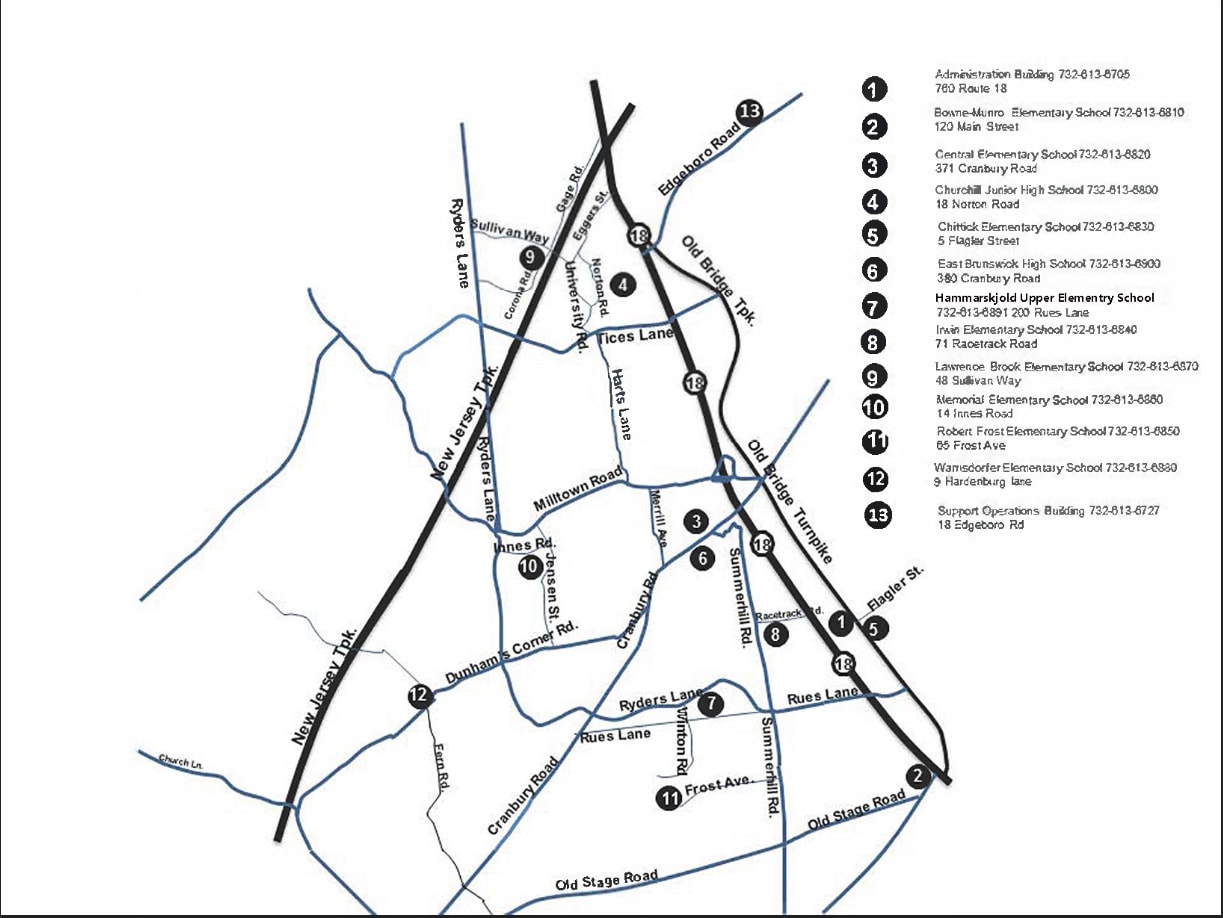
East Brunswick School DistrictThe school district home page provides information for students and parents about the Board of Education, academics, athletics, activities, transportation, and more. Click here for a School District Map. See the New Jersey School Performance Report by District or by School.
|
|
|
East Brunswick Solid Waste & RecyclingHere you will find a monthly calendar, street index, information about bulk collection. Use the search engine to determine what and where to recycle. |
|
|
East Brunswick TownshipThe Township's home page provides information about the community, departments and services, government and public safety. The EB codebook is here. |
|
|
East Brunswick TownshipThe Township of East Brunswick was established in 1860. Since January 1, 1965, the Township has operated under the Mayor-Council Plan E form of government pursuant to the Faulkner Act, Chapter 69A of Title 40 of the New Jersey Statutes. The Mayor is the chief executive of the community who is chosen for a four year term at the regular Presidential election in November and serves part-time. While the Mayor does not preside over, nor have a vote on the Council, he or she may vote in the case of a tie on the question of filling a Council vacancy. The Mayor also has veto power over ordinances, but vetoes can be overridden by a two-thirds vote of the Council. The Township Council is the legislative body. There are five members elected at large for staggered four-year terms at the general election held in even-numbered years. |
|
|
East Brunswick Water UtilityThe Consumer Confidence Report, also known as Quality on Tap, summarizes information regarding water sources (i.e., rivers, lakes, reservoirs, or aquifers), any detected contaminants, compliance and educational information. The reports are made available to customers by July 1st of each year. |
|
|
East Brunswick Water UtilityThe Consumer Confidence Report provides information about East Brunswick's water sources (rivers, lakes, reservoirs, or aquifers), water quality, any detected contaminants, and compliance. The reports are made available to customers by July 1st of each year. |
 |
EBPL Technology Training CoursesEBPL offers technology training courses, from PC Literacy to social media to Photoshop. |